

When building projects that involve two-way communication like monitoring dashboards, robotic control systems, or IoT, one of the biggest challenges is transmitting visual data (video) in real-time.
Traditional approaches like polling (where the client asks the server, “Is there a new frame?” every second) often result in poor latency and choppy video. If you need an instant response (for example, to control something remotely), a latency of 1–2 seconds is disastrous.
Recently, while optimizing a remote control project, I explored ways to build a robust video streaming setup using purely Python, without relying on heavy third-party applications.
Let’s break down three key concepts behind real-time, ultra-low-latency data streaming in Python!
Producer-Consumer Pattern with Multithreading
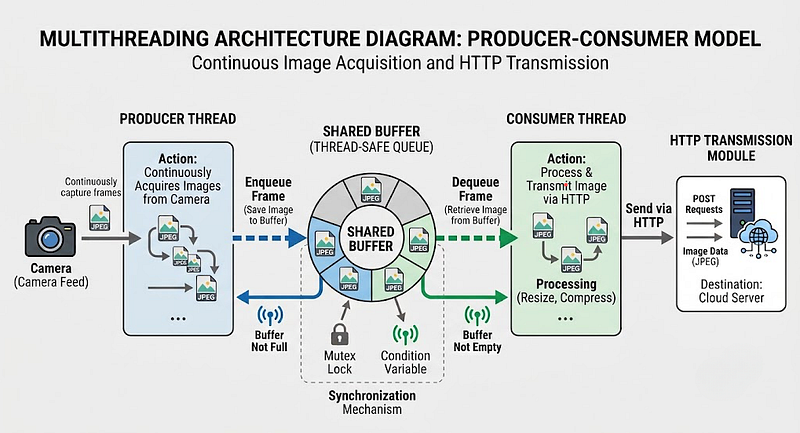
The most common mistake when building a streaming server is placing the camera-reading logic and the web-transmission logic within the same loop. If the client network suddenly slows down, the camera-reading process on the server will also slow down (become blocked) as a result.
The solution is a Producer-Consumer architecture utilizing a multithreading system. We can break the application down into two threads that run concurrently and asynchronously:
- The Producer (Capture Loop)
A thread tasked solely with reading frames from the camera as quickly as possible. Once a frame is read, it overwrites a global variable (let’s call it LATEST_FRAME) that serves as shared memory. - The Consumer (Server Loop)
An HTTP server thread (such as HTTPServer) whose sole task is to serve client requests. When serving a streaming route (endpoint), the server simply retrieves the data from LATEST_FRAME and sends it.
This way, the camera does not care whether the client is slow or disconnected; it continues to update the buffer. Consequently, the client always receives the freshest frame without queuing lag.
HTTP Header magic: multipart/x-mixed-replace
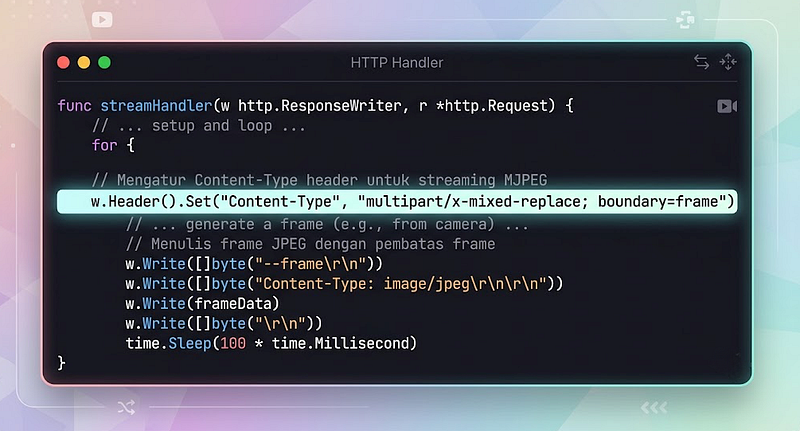
Many people assume that creating an interactive stream requires the use of WebSockets. In reality, for one-way streaming, such as video, standard HTTP protocols can be transformed into a continuous stream thanks to a highly effective, long-standing technique known as Motion JPEG (MJPEG).
The key lies in the HTTP response sent from the server. Instead of responding with a standard “200 OK” and an `image/jpeg` content type before closing the connection, we send a specific content type: `multipart/x-mixed-replace; boundary=frame`.
What does that mean?
- multipart: Informs the browser or client that the server will send data packets in multiple parts.
- x-mixed-replace: Informs the client to overwrite (replace) the old part on the screen whenever a new part arrives.
- boundary=frame: We define the word “frame” as the dividing boundary between images.
Thus, the connection is kept open indefinitely (keep-alive). The server continuously streams new image data separated by the string ` — frame`, and the client renders it as if it were a moving video. This method is very lightweight and is natively supported by almost all modern browsers and UI networking modules.
Pre-transmission Compression
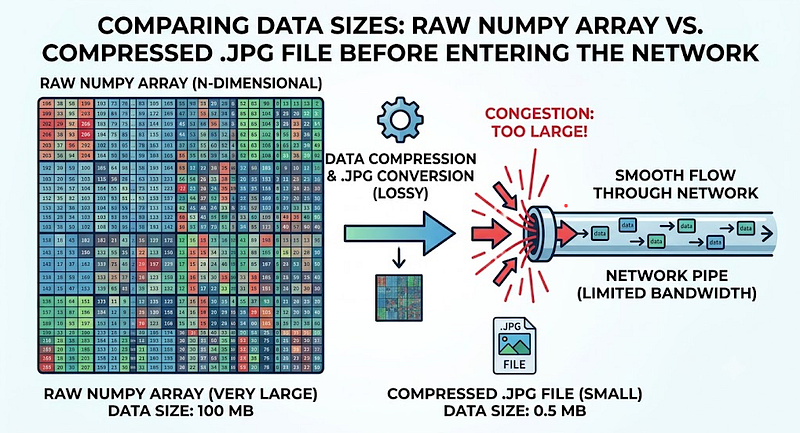
Even though we already have fast multithreading architecture and a continuous HTTP protocol, there is one more pitfall: data size.
Camera images (especially when read using libraries like OpenCV) are essentially large arrays containing raw pixel values. Sending a raw array of millions of bytes over the network 30 times a second is the fastest way to choke your WiFi router.
Therefore, it is essential to compress image frames into a format like JPEG before storing them in global memory for streaming. Encoding to .jpg at the backend level will drastically reduce the required bandwidth and make data movement across the network feel instantaneous.
Conclusion
Building a real-time streaming system from scratch teaches us many fundamental concepts of computing. By combining task isolation via multithreading, leveraging unique HTTP protocol features (such as multipart), and optimizing network data compression, we can create a clean, stable, and low-latency streaming infrastructure.
This simple architecture ensures that the core system logic behind the scenes can respond to commands instantly, while the “eyes” (camera feed) remain vigilant, monitoring without interruption!